
Print Ad Specifications
Follow these guidelines to ensure your print ad is production-ready and prints at the highest quality.
Magazine/Directory/Oversized Roster Publications: 8.375″ x 10.875″
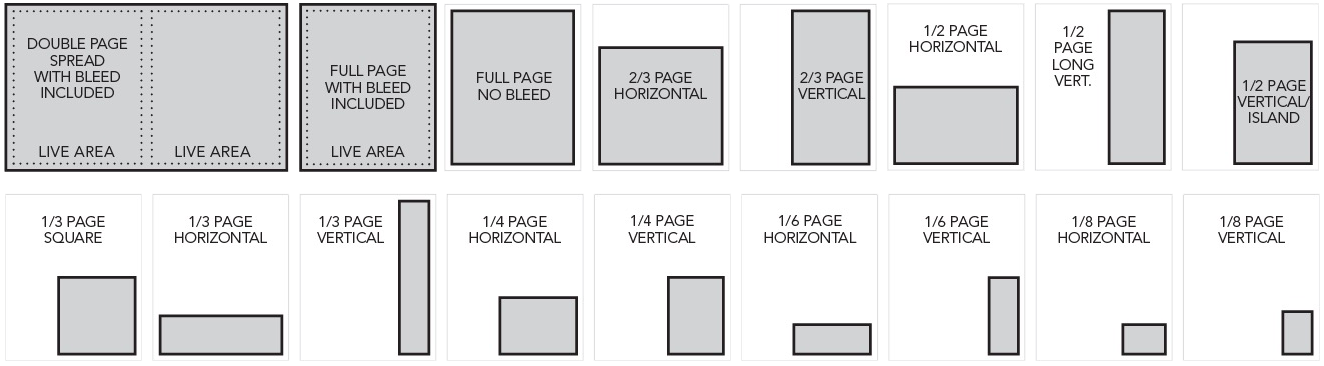
Ad Shape |
Inches |
|---|---|
Double Page Spread with bleed
|
17″ x 11.125″ 16.75″ x 10.875″ 7″ x 9.5″ per page |
Double Page Spread no bleed
|
15.417″ x 9.5″ 7″ x 9.5″ per page |
|
Oversized Inside Front Cover/Inside Back Cover/ Outside Back Cover with bleed
|
9.125″ x 11.125″ 7″ x 9.5″ |
Full Page with bleed
|
8.625″ x 11.125″ 7″ x 9.5″ |
| Full Page no bleed | 7″ x 9.5″ |
| 2/3 horizontal | 7″ x 6.333″ |
| 2/3 vertical | 4.583″ x 9.5″ |
| 1/2 horizontal | 7″ x 4.583″ |
| 1/2 vertical | 4.583″ x 7″ |
| 1/2 long vertical | 3.333″ x 9.5″ |
| 1/3 horizontal | 7″ x 3″ |
| 1/3 vertical | 2.166″ x 9.5″ |
| 1/3 square | 4.583″ x 4.583″ |
| 1/4 horizontal | 4.583″ x 3.333″ |
| 1/4 vertical | 3.333″ x 4.583″ |
| 1/4 banner | 7″ x 2.166″ |
| 1/6 horizontal | 4.583″ x 2.166″ |
| 1/6 vertical | 2.166″ x 4.583″ |
| 1/6 banner | 7″ x 1.416″ |
| 1/8 horizontal | 3.333″ x 2.166″ |
| 1/8 vertical | 2.166″ x 3.333″ |
| 1/12 horizontal | 2.166″ x 2.083″ |
| 1/16 banner | 2.166″ x 1.583″ |
| Classified logo | .5″ x 1.333″ .666″ x .666″ 1.333″ x .5″ |
*The Live area is based on a standard, spiral bound publication. Please reach out to your sales representative if you need further details.
Roster Publications: 5.75" x 8.5"
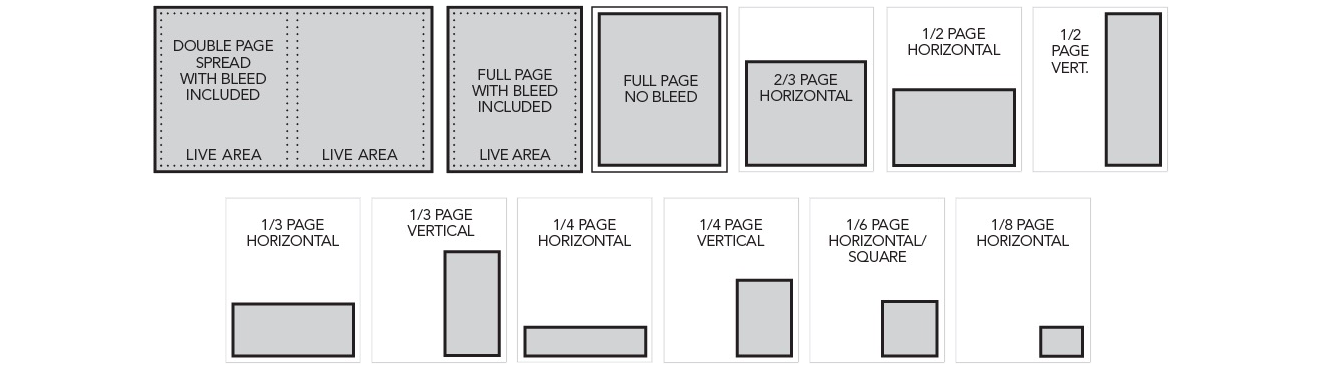
Ad Shape |
Inches |
|---|---|
Double Page Spread with bleed
|
11.75″ x 8.75″ 5″ x 7.5″ per page |
Double Page Spread no bleed
|
10.75″ x 7.5″ 5″ x 7.5″ per page |
Oversized Inside Front Cover/Inside Back Cover/Outside Back Cover with bleed
|
6.375″ x 8.75″ 5″ x 7.5″ |
Full Page with bleed
|
6″ x 8.75″ 5″ x 7.5″ |
| Full Page no bleed | 5″ x 7.5″ |
| 2/3 horizontal | 5″ x 4.916″ |
| 1/2 horizontal | 5″ x 3.666″ |
| 1/2 vertical | 2.33″ x 7.5″ |
| 1/3 horizontal | 5″ x 2.333″ |
| 1/4 horizontal | 5″ x 1.666″ |
| 1/4 vertical | 2.333″ x 3.666″ |
| 1/6 horizontal | 2.333″ x 2.333″ |
| 1/8 horizontal | 2.333″ x 1.666″ |
| 1/10 banner | 2.333″ x 1″ |
*The Live area is based on a standard, spiral bound publication. Please reach out to your sales representative if you need further details.
Digital Artwork
- All digital greyscale and color art should be at 300 dpi
- The following digital file types are accepted:
- Acceptable file formats: all Adobe products – Acrobat (PDF files with fonts embedded), InDesign (INDD or IDML files with accompanying links and fonts included), Illustrator (EPS or AI files), Photoshop (JPG, PNG, TIFF, PSD)
- Accepted but not recommended: Powerpoint, Word, Publisher, Excel
- Not accepted formats: Freehand, Corel Draw, Paint, Quark
- Vector artwork should be saved in an EPS format with fonts and images embedded, or all images and fonts must be supplied
- All screen and printer fonts must be provided
- We will substitute with similar fonts if originals are not submitted
- Text can be converted to outlines, but if proofing errors are discovered, new art may need to be submitted
Images from the web are not suitable for printing.
Color and Greyscale Art (Photographs)
All scanned artwork must be scanned between 300 to 600 Dots Per Inch (DPI). The images should not be scaled beyond 75% and 125% of the image’s original size.
Example of Scanning Resolutions:
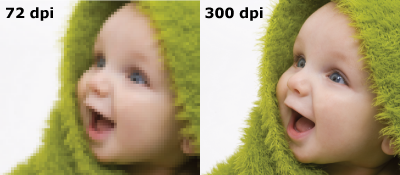
When an image is scanned at a low resolution, the pixels are larger and must represent larger pieces of the original, resulting in less picture detail, less color information, and an obvious degradation in the quality of reproduction. On the other hand, scanning at too high a resolution will be counterproductive; the file size of the scanned image will be unnecessarily large, causing longer process time at the RIP, with no gain in the quality of the printed halftone.
All work should be in the CMYK (Cyan/Magenta/Yellow/Black) mode, as this is the mode required for the printing process.
If an RGB (Red/Green/Blue) file is submitted, it must be converted to CMYK. When the conversion takes place, color shifts can occur.
Naylor will do our best to reproduce as close to a match to your printed output as possible.
Line Art (Black and White Logos, Type)
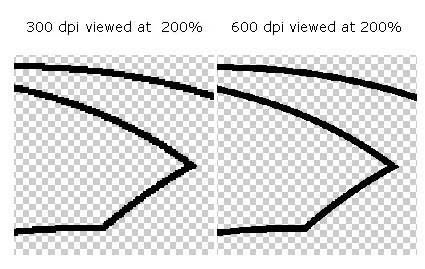
All line art should be scanned at 600 dpi for the best quality output. Otherwise, you risk a “jaggy” appearance in the printed image.
Outsert Specifications
Unless otherwise stated, all outserts/inserts are created on 80 lb coated stock. Exceptions to this are heavy stock inserts (100 lb cover stock), flysheets (70 lb offset stock), postcards (8pt cover stock), and bookmarks (Hyson cover stock).
Standard Outsert*
Heavy Stock Insert*
- 8.375″ x 10.875″ with 4″ tab panel – Saddle Stitch
- 8.125″ x 10.875″ with 4″ tab panel – Saddle Stitch
- 8.375″ x 10.875″ – Perfect Bound
Bellybands
- Specifications are dependent on publication size. Please contact your Naylor representative for the correct template
Bookmarks
- 8.25″ x 2″ template
- 10.75″ x 2″ template
- Directory size publication 10.8125″ x 2.375″ template
- Roster size publication 8.5625″ x 2.375″ template
Brochures*
- Standard C-fold template
- Standard Z-fold template
- Other sizes available upon request
Postcards
- Standard size is 6″ x 4.25″. Other sizes available. Must be smaller than the publication size
Reply Card
*All outserts must be created at an equal or smaller size than the publication to be included in the polybag. Contact your Naylor representative to confirm publication size. Folding service is available at an additional charge.
Need help formatting your ad or confirming specs?
Contact your Naylor representative or our production team